Content is not applicable for Go or Free projects.
Submittal Packages
From your mobile device, you can view submittal packages, attached individual submittals, and any linked files or records while working in the field.
In mobile, submittal packages are available in read-only mode. To edit a submittal package, go to ProjectSight web with a supported browser.
 List View
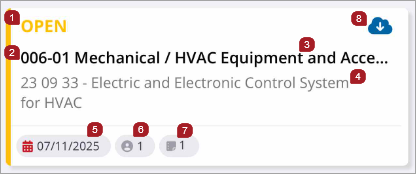
- Status
-
A submittal package with a closed status displays a lock icon to the right of the status.
- Record number - revision
- Description
- Spec Section
- Due date
- Assignee information
- Number of linked drawings
- Downloads all the drawings or files linked to the submittal package. Any new links will be automatically downloaded when the project is synced.
Record View

- Record number
- Record status
- Closed - If the Closed toggle is enabled from the web, the record is locked and closed. If disabled from the web, this field is hidden.
- Description - Select to open the read-only Description page
- Number of attachments - Select to open the Attachments page, then download, open, or share attachments
- Select to only download this file
- Number of comments - Select to open the Comments page and read all comments
- Revision number
- Spec section - Select to open a pop-up that displays the parent of the spec section
- Due date
-
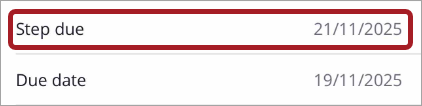
For ProjectSight Enterprise users working with workflow templates, a step due date also displays. Step due displays above the due date for steps that are not in an initial or finished state.
- Type
- Importance
- Trade
- Author package number
- Location
- Assigned to - Select to view all assignees in the Assign to page
- CC'D - Select to view all courtesy copied team members in the CC'd page
- Records - Select a link to open a linked record.
- Web links - Select a link to open a URL in your device's web browser. Links must be added in the web application.
- Submittal card - Select an attached submittal to open the read-only Submittal record
- User Defined Field (UDF)
- Submittal packages are available in read-only mode.
View Attached PDF
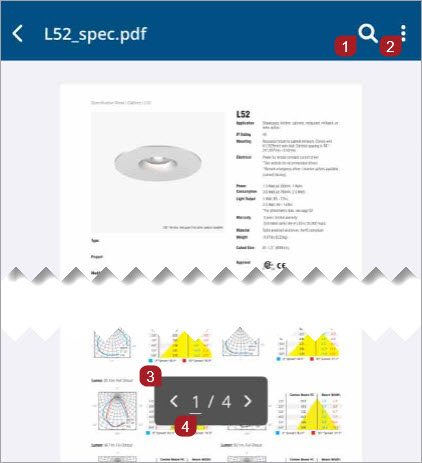
- Search for keywords in the document
- Sub-menu: View thumbnails or share
- Navigate to the previous or next page
- Jump to a specific page in the document
Viewing
For information on how to search, sort, and filter the submittal packages list, see Filter, Sort, and Search.