Supported Languages
In addition to English (United States), the following languages are supported in ProjectSight:
- Dutch (Nederlands)
- French (Français)
- German (Deutsch)
- Spanish (Mexico)
- English (United Kingdom)
For user interface text, the application defaults to the language that you selected in your Trimble ID profile. If you already have a Trimble ID, and you would like to change your preferred language, go to the My Profile page (  > My profile).
For your Trimble ID, if you select English (United Kingdom) in the Language field and Australia or New Zealand in the Country or Region field, some terminology will reflect the Australasia region dialect.
For example, while the United States uses the term "punch item", the United Kingdom uses "snag", and Australasia uses "defect".
Date, Number, and Time Formats
In the mobile application, date, time, number, and time zone formats follow the region that you select in your mobile device, while user interface text follows your Trimble ID language selection.
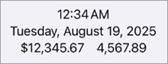
Example of region formats for United States.
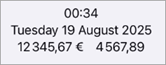
Example of region formats for France.
- To change the region in an Apple device go to Settings > General > Language & Region.
- To change the language, date, or time formats in an Android device go to Settings > General Management.
For the web application, date, time, number, and time zone formats follow the region that you selected for your Trimble ID. When mobile is synced to the web, the updates you save and sync will display in the web app based on your Trimble ID, but still display in the mobile app based on the region you select for your mobile device.
Viewing
 To change the language for interface text
- From the My projects page, select .
- From the project menu, select My profile.
- In the Preferences section, select the Language field.
- Choose your preferred language.
A language list displays.
Other Trimble products, such as Trimble Connect, may support additional languages. If you select a language that ProjectSight doesn't support, the app defaults to English.