ProjectSight Mobile
Take ProjectSight's cloud-based construction project management software with you in the field on your phone or tablet.


 Download
May 30, 2026 Version 2026.08
 Feature enhancements
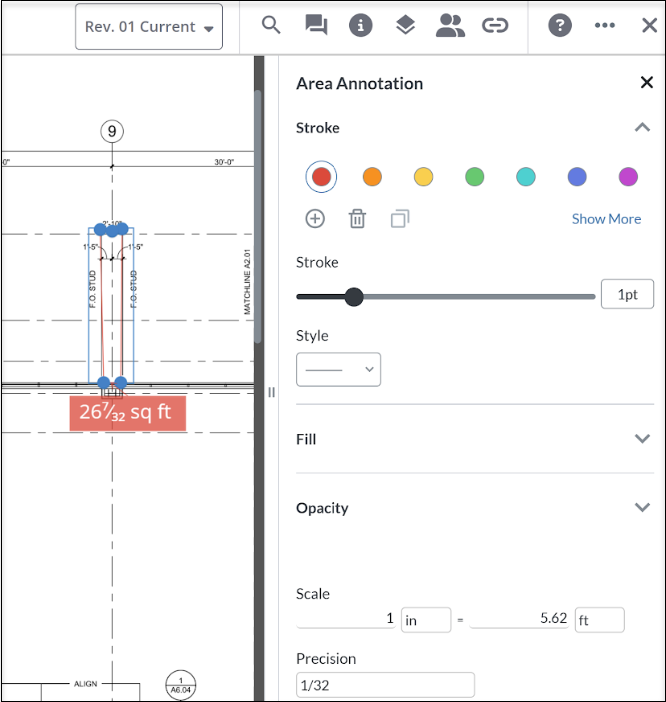
New annotation panel
We replaced the old annotation style popup drawing viewer with a standard style panel that includes a measurement annotation edit tool.
Resolved issues
- PDF files show their bookmarks in the Attachment to Records viewer. (CN 000004561 / PS-64628)
- The RFI tags stay with the cloud markup on the drawing sheet. (CN 000004933 / PS-67494)
- User is able to extract pages from ProjectSight native PDF viewer. (CN 000005064 / PS-68184)
- Drawing annotations properly display when viewing it from a browser. (CN 000005100 / PS-68312)
May 21, 2026 Version 2026.07.1
Resolved issues
- The display checkboxes when adding or editing a user does not need to be adjusted. (CN 000016903 / PS-68996)
- The right pane in the Security role assignment window is accessible and searchable. (CN 000016959 / PS-69120)
May 19, 2026 Version 2026.07
Resolved issues
- Specific budget line items open with optimal load times and consistent browser stability. (CN 000004808/PS-66519)
- Notifications don't overlap and are easy to read in the homepage Notifications popup. (CN 000004910/PS-67307)
- The SCO record is integrated only once in Vista when the user saves a pending record. (CN 000004985/PS-67926)
- Upload documents to checklists does not encounter an Object Reference not set to an instant of object reference error. (CN 000005084/PS-68268)
- When adding users, the Save and add another button is visible. (CN 000005096/PS-68282)
May 12, 2026 Version 2026.06
Feature enhancements
BCF topics in ProjectSight 360 capture viewer
The ProjectSight 360 Capture module is only available in North America and the UK.
The Trimble Connect 360 Viewer, embedded within ProjectSight, now supports the ability to create and manage BCF topics and views. This allows you to tag your teammates with contextual 360 data to help everyone stay on the same page. By integrating with Trimble Connect, ProjectSight 360 Capture allows you to share context across the entire Trimble ecosystem.
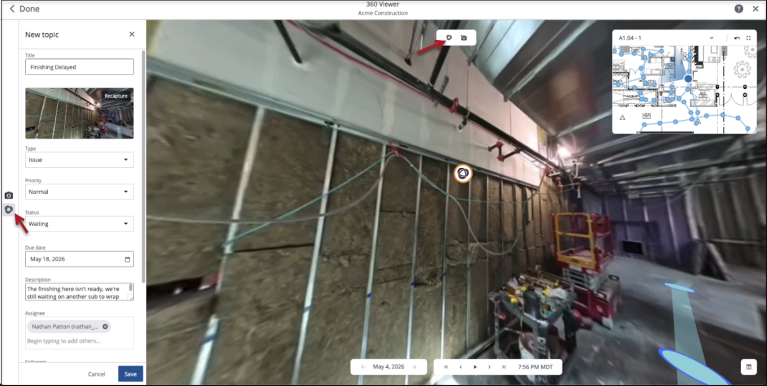
Link 360 capture to existing annotation
Upload and attach new 360 photo and video captures to an existing annotation. Use this to build a capture history and keep a record of work done.
Resolved issues
- The browser will not crash when selecting a user from a users page with a large number of projects. (CN 000005111/ PS-68380)
May 2, 2026 Version 2026.05
Feature enhancements
Introducing ProjectSight 360 Capture
The ProjectSight 360 Capture module is only available in North America and the UK.
360 Capture is a new module built right into ProjectSight, available as an add-on.
360 Capture uses AI to automatically map 360-degree videos or photos of your job sites to their corresponding drawings. 360 Capture enables anyone to track progress across time, prevent expensive mistakes, and resolve disputes using virtual tours of the job site.
How it works
- Contractors in the field use the ProjectSight mobile app and a 360 camera to take and upload pictures and videos of the job site.
- After quick processing, photos and videos are available on ProjectSight Web.
- From ProjectSight Web, users can:
- Look back at any previous phase of the job site's history
- Link records and tasks, like RFIs and punch items, to 360 captures without ever leaving ProjectSight
- Generate reports containing 360 captures
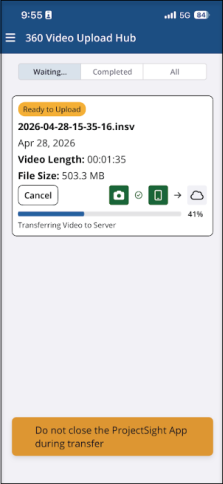
360 mobile video transfer and upload
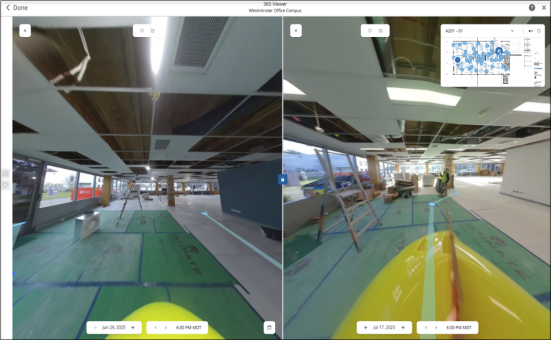
360 side-by-side comparison
Who it's for
360 Capture is for everyone. General contractors get a full view of their projects remotely, helping them manage complicated jobs and hold teams accountable without needing to visit the site. Specialty subcontractors get time-stamped pictures that prove their installations are correct, protecting them against someone else’s mistakes. All project teams benefit from 360 Capture.
To purchase the 360 Capture add-on for ProjectSight, please contact your local Trimble Sales Representative.
Resolved issues
- When downloading drawings/specs with As Builts, the annotations with links to records include default reports. (CN 000004620/ PS-62009)
- Linked files in pop-up report Email Report window can be seen when scrolled. (CN 000005071/ PS-68208)
- Inactivity emails are being sent with the correct frequency. (CN 000005095/ PS-68281)
- Scrolling works when selecting the report email option. (CN 000005110/ PS-68342)