ProjectSight Mobile
Take ProjectSight's cloud-based construction project management software with you in the field on your phone or tablet.


 Download
April 22, 2026 Version 2026.04.2
 Resolved issues
- Submittals can be routed via email when changing a report’s linked file setting to Embed in Report. (CN 000005082/ PS-68256)
April 21, 2026 Version 2026.04.1
Feature enhancements
BCF topics
You can now link BCF topics to ProjectSight records, providing enhanced 3D model collaboration capabilities.
Resolved issues
- When emailing reports in ProjectSight, it pulls distribution lists. (CN 000005054/ PS-68163)
-
The Search button (magnifying glass) can be used on the To, CC, or Bcc lines. (CN 000005055/ PS-68164)
-
Now able to access projects without getting Error: You are not authorized to access this type of record. (CN 000005060/ PS-68169)
April 18, 2026 Version 2026.04
Feature enhancements
Localized help content
Translated content is now available in ProjectSight Help. Some articles may remain in English as we continue to update our documentation in all supported languages.
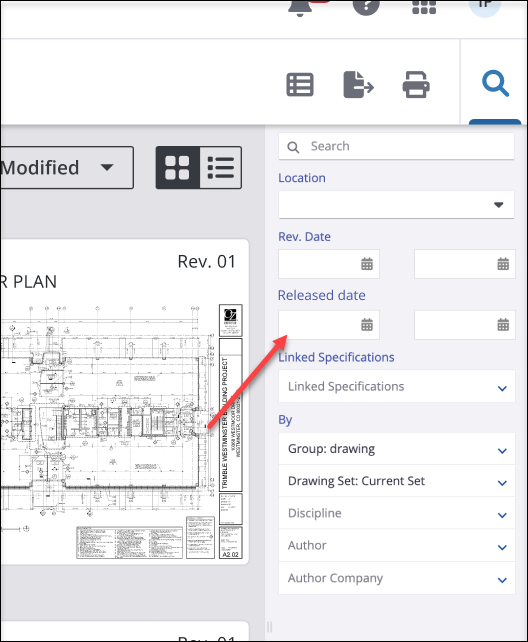
Released date field
A Released date field is now available in the Drawing Viewer and Drawings module. This optional field tracks the release timing for individual drawing revisions. The Released date field is integrated into the upload dialog, drawing sets module, and the record information tab. It is also available in the Bulk Edit dialog, positioned after the Rev. date field. In the Drawings List View, users can group, filter, and sort by this field. It appears in reports when the column is included in the list view.
Expanded name limits
We've increased First and Last name field limits to 50 characters for contacts to prevent truncation and maintain consistency with your Human Resource systems.
Resolved issues
-
When uploading multiple files to the photos module, ProjectSight uploads all of the photos. (CN 000002764 / PS-61026)
-
Drawing AI is able to generate the drawing callouts/hyperlinks. (CN 000002788 / PS-61233)
-
The Specification section name refreshes in Spec Sets. (CN 000002836 / 61601)
- Submittal revisions won’t auto-assign to a single user, and clicking the padlock icon won’t redirect to the Daily Report workflow. (CN 000004784 / PS-66315)
- Custom fields in the Daily Report Labor section appear as expected. (CN 000004809 / PS-66520)
- The Contract Number field in the PCO Items section displays only the contracts associated with the selected company. (CN 000004828 / PS-66709)
- Users can bulk add courtesy copies (CC) and assignments to records without encountering errors. (CN 000004855 / PS-66848)
- In Specs, page manipulate action on an unpublished specification set works. (CN 000004889/ PS-67018)
- Tracking tab calculates the difference between due dates and scheduled dates. (CN 000004913 / PS-67312)
-
In the UK instance of ProjectSight, the dates are set to DD/MM/YYYY. (CN 000004915 / PS-67331)
-
When creating a new drawing set, the auto filling text displays as a normal rectangle. (CN 000004952 / PS-67770)